
Blue vase for shelves and tables
A blue vase with a rounded silhouette. Add it to a shelf or table as a simple decorative accent.
Details to confirm Material, dimensions, and care instructions
Your hub for product marketing
Turn product photos and details into Instagram posts, Pinterest Pins and store drafts. Find your next campaign idea and prepare a newsletter—with you in control of what goes out.
Create an account No store connection required.
One product. Store and social drafts.
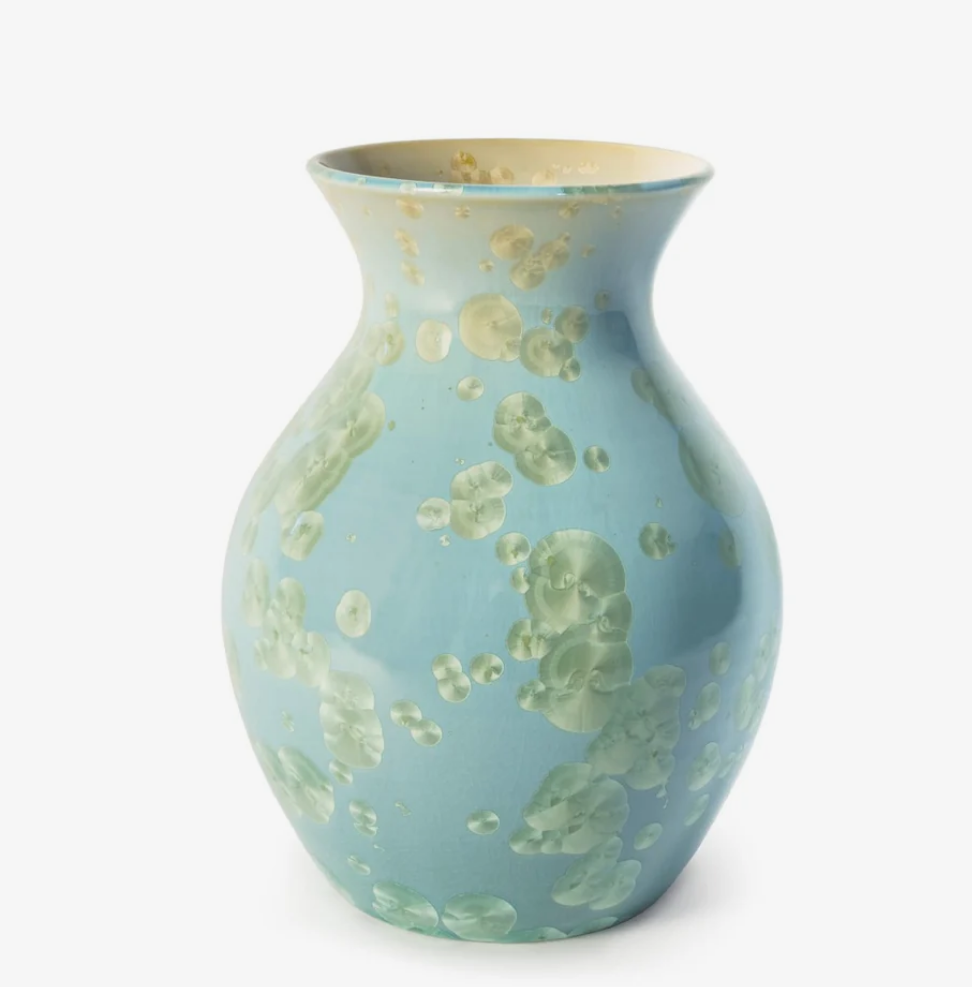
Product photo + confirmed product details
A blue vase with a rounded silhouette. Add it to a shelf or table as a simple decorative accent.
Details to confirm Material, dimensions, and care instructions
 Instagram postDraft for review
A rounded blue vase brings a new focal point to a shelf or table. Where would you put yours?
You choose Review the photo, caption and connected professional account before publishing.
 Pinterest PinDraft for review
Bring a touch of blue to a shelf or table with this rounded vase. See the product for details.
Destination link Your product page
Illustrative draft layout. Product facts come from details you supply or confirm—not from a photo alone.
How it works
Add photos and product details—or choose an existing product.
Choose where you want to use the content, then generate drafts.
Review, edit, and publish supported connected outputs.
A reason to show up again
Start with your own idea or explore suggestions grounded in your business.
Explore ideas based on supported catalog details, seasonal context and verified product milestones. Where available and authorized, Instagram engagement and eligible store sales can help inform suggestions.
See why an idea is suggested, then choose the product and edit the angle. Available evidence varies by connection and permission; suggestions are not sales forecasts.
Prepare an editable subject, preview text, product story and call to action for an eligible Shopify, WooCommerce or Wix product.
Copy the content into your email tool, review your audience and send there. NOMEV does not send the email or transfer your mailing list.
Background recommendations and optional AI image analysis have separate permission controls. Store sales access requires the relevant store authorization. Pinterest account content is excluded from recommendation intelligence. Manage optional choices in NOMEV’s Data & privacy settings; read how data is handled.
Build on your saved work
Reuse saved product details and supported preferences when creating your next draft.
Choose a saved product to start with its details again. Supported preferences apply in their relevant product and channel context.
Available destinations
Start without a store. Connect a supported destination when you’re ready.

Import products and create product or blog drafts for your connected store.
Explore NOMEV for ShopifyChoose a store product and prepare product, blog and newsletter drafts.
Connect your store with the required access. Sales suggestions and reviewed product or blog publishing each require their own permission.

Connect your Wix store, browse its catalog and prepare a reviewed blog draft or product newsletter.
Install NOMEV on a compatible Wix site and connect it to your workspace. Daily sales access is optional and separate from catalog access.
Connect your Wix storeCreate Pins from your product content. Review and publish to selected boards.
You choose the copy, image, and destination link.
Connect your Instagram professional account, review your posts, publish them and view Insights.
An eligible professional account and the relevant account permissions are required. You approve each post before publishing.
Instagram service operated by Mark Katz Photography. Business details

Create an editable product post and call to action to copy to Facebook.
Direct publishing is not available.
Small business owners connect their own Instagram professional account in NOMEV Hub. They upload images, add product facts and context, choose and edit a caption, review the destination account, and explicitly approve publishing.
Instagram account information identifies the connected destination. Account authorization enables NOMEV to publish the posts the user approves. Eligible engagement can inform recommendations where the required access and permissions are in place. Optional background preparation has its own disclosure and consent; connecting an account does not enable every optional use.
Users can disconnect Instagram in the Hub or request deletion of their NOMEV data. Business and contact details.
Make one product go further
Create coordinated listing and social drafts from confirmed details.
Explore product marketing →Use supported catalog context and available signals to choose a fresh angle.
For artists and photographers →Turn a featured product into a newsletter draft to finish in your email tool.
See newsletter drafts →Before you begin
No. Start with your own photos and product details. Connect Shopify, WooCommerce or a compatible Wix store for supported store workflows. Connection requirements and outputs vary by platform.
Create editable product, blog, social and eligible product-newsletter drafts. Shopify, WooCommerce and Wix support connected store workflows with the required permissions. Pinterest supports reviewed Pin publishing. Facebook is draft only. Instagram supports professional-account connection, reviewed publishing and Insights with the relevant account permissions.
Supported product and catalog facts, seasonal context and verified milestones can inform ideas. Eligible Instagram engagement and store sales can contribute where available and authorized. NOMEV explains the evidence behind suggestions; it does not promise more sales. Pinterest account content is not used for recommendation intelligence. Optional background preparation and AI image analysis have separate consent controls.
No. NOMEV helps prepare editable newsletter content for eligible products. Copy it into your email tool, add the product image, check the audience and send there. Saving a draft or opening the email tool does not send it. Where send tracking is available, record the send only after you have sent the email.
Reuse saved product details and supported preferences where they apply. Preferences are scoped to supported products, channels, and contexts; every edit does not immediately become a preference. Pinterest account content is not retained for business learning.
No. Review and edit your drafts first, then choose which supported connected outputs to publish. Supply or confirm details such as materials and dimensions; a photo alone does not establish those facts.
Start with one product
Bring your photos and product details. Make the result your own.
Create your first draftCreate an account · No store connection required.